
SYSTEM MENTAL MODEL
Key takeaways
- ECAM is the aircraft-monitoring and crew-information function; it should not be confused with the FWS or the physical display itself.
- The A350 FWS performs alert computation and prioritization.
- The CDS provides the cockpit display environment.
- Six Display Units support several display formats rather than six permanently dedicated single-purpose screens.
- AFDX is a major data path, but backup and alternative interfaces also exist.
- Alert level and failure category describe different things.
- Flight-phase logic can inhibit alerts to reduce unnecessary crew workload during critical phases.
- Dispatch information has a different purpose from an active in-flight warning or caution.
- Display reconfiguration means the loss of one DU does not automatically mean that the underlying aircraft information has been lost.
ECAM FUNCTION
What the A350 ECAM actually does
ECAM stands for Electronic Centralized Aircraft Monitoring.
Its purpose is broader than displaying faults. During normal operation, it supports aircraft-system monitoring, memos, operational information and normal checklists. During abnormal operation, it provides the visual environment through which warnings, cautions, procedures, limitations and relevant system information are presented.
The supplied A350 ATA 31 material describes ECAM information across several display areas, including the Warning Display (WD), System Display (SD), Engine Display (ED), parts of the Primary Flight Display (PFD) and checklist functions on the MultiFunction Display (MFD).
Airbus publicly describes normal checklists on the A350 as integrated into the MFD and accessible through the KCCU.
The important point is that ECAM is an information-management function spanning several elements of the cockpit—not simply the center screen.
FUNCTION SEPARATION
ECAM, FWS and CDS: three functions learners often mix together
These terms are related but not interchangeable.
| Function | Main role | Think of it as |
|---|---|---|
| FWS | Detects conditions, computes and manages alert information | Decision and alert logic |
| CDS | Manages the display environment and presentation | Display platform |
| ECAM | Provides aircraft monitoring, alerts, procedures and system information to the crew | Operational monitoring interface |
| ECP | Provides direct controls for ECAM/FWS functions | Crew control interface |
| KCCU | Provides keyboard and cursor interaction with supported applications | Interactive data-entry/navigation interface |
This separation gives a much more useful mental model during technical study. A warning appearing on the WD does not mean the display itself detected the aircraft failure. The display is presenting information produced through a larger chain of aircraft systems, data interfaces and FWS logic.
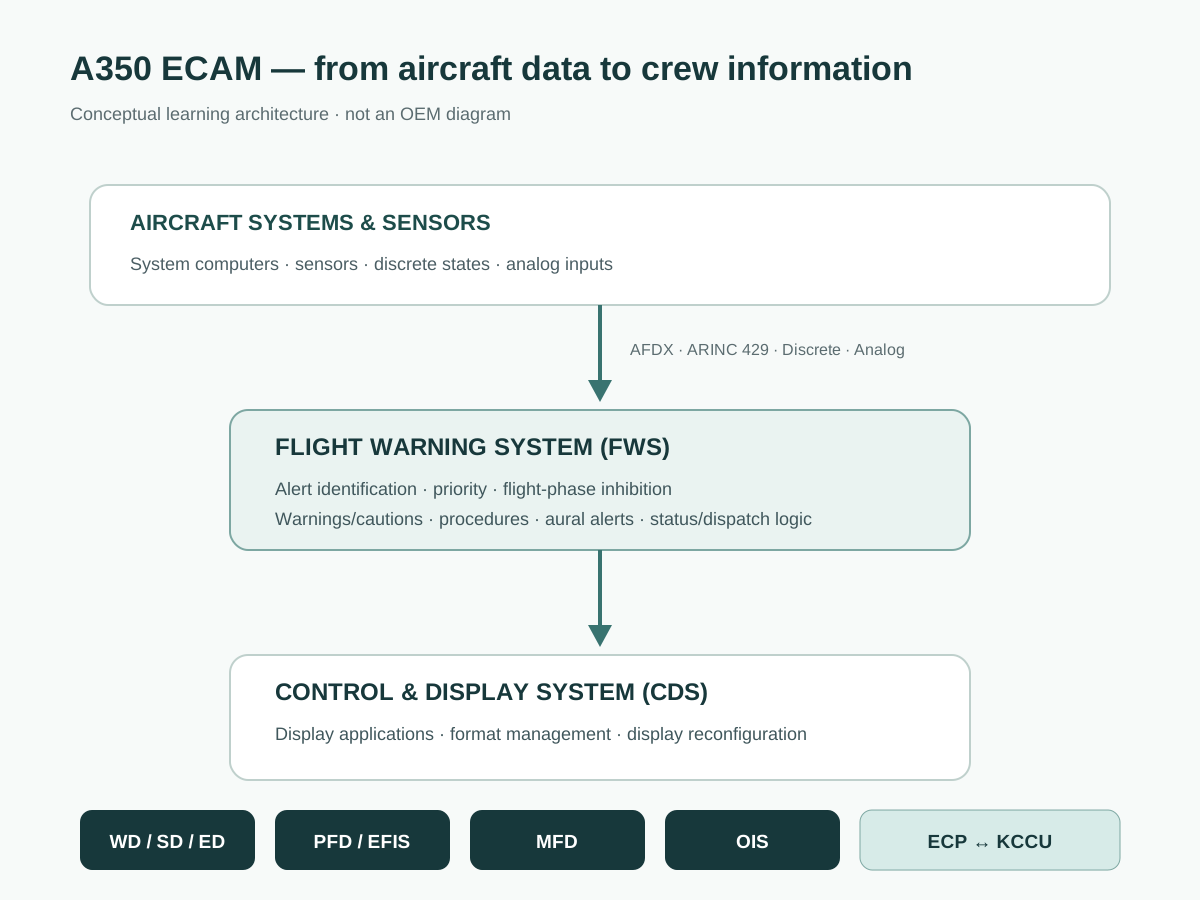
DATA → DECISION → DISPLAY
How information reaches the A350 ECAM
Aircraft systems and data acquisition
The A350 is a highly networked aircraft. Much of the operational information used by the CDS and FWS travels over AFDX — Avionics Full Duplex Switched Ethernet, an avionics data-network technology used to exchange deterministic digital information between aircraft systems.
However, AFDX should not be treated as the only possible data path. The ATA 31 source material identifies additional interfaces such as ARINC 429, analog inputs and discrete signals. Certain data paths are retained as backup or dedicated interfaces where required.
That redundancy is an important technical lesson: a network failure and a total loss of aircraft information are not necessarily the same condition.
Flight Warning System computation
The FWS continuously receives aircraft-system and sensor information and evaluates it against its alert logic.
In the supplied configuration, two redundant FWS applications perform computations in parallel. The FWS manages functions including alert identification, alert priority, flight-phase-related inhibition, warning and caution information, associated procedures, aural-alert management, memo information, dispatch information and operational status information.
This is why calling the FWS “the ECAM screen computer” is misleading. Its responsibility extends into alert logic, prioritization, procedures and interfaces with several other aircraft functions.
Control and Display System presentation
The Control and Display System (CDS) provides the environment in which the resulting information is presented.
The source describes six identical Display Units and two KCCUs. DU-to-DU communication uses the AFDX network, while KCCU interaction with the displays uses dedicated CAN connections.
The architecture therefore separates four concepts: data generation → alert computation → presentation → human interaction.
SIX SMART DISPLAYS
The six-display A350 cockpit architecture
The A350 CDS uses six Display Units rather than assigning a unique hardware type to every display position.
In normal configuration, the supplied ATA 31 material identifies the formats broadly as ECAM on the upper center DU, MFD on the lower center DU, EFIS on the Captain and First Officer inner DUs, and OIS on the Captain and First Officer outer DUs.
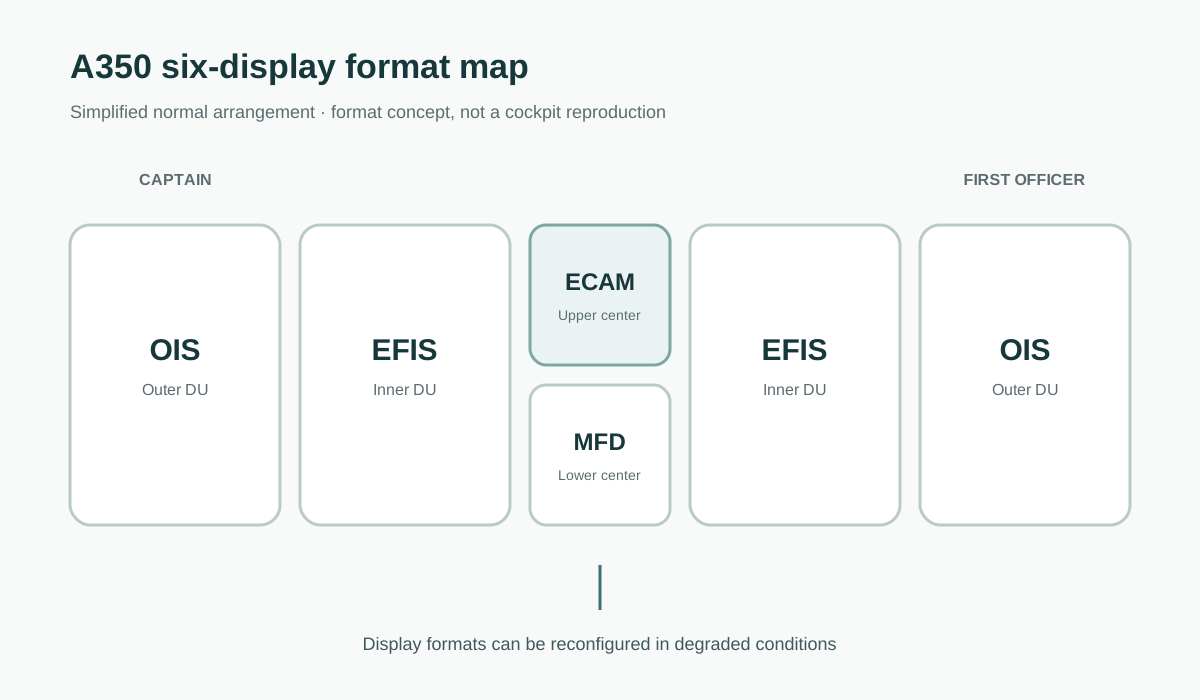
ECAM, EFIS, MFD and OIS formats
EFIS concentrates flight and navigation information, particularly the PFD, ND and Vertical Display environment.
ECAM presents engine, aircraft-system, warning, status and related monitoring information.
MFD provides interactive functions and menus, including electronic checklist interaction.
OIS — Onboard Information System supports operational and maintenance-related applications.
Thinking in terms of formats rather than fixed physical screens becomes particularly important when studying display reconfiguration.
Why the Display Units are called smart displays
The DUs do more than receive a finished video picture from a central display computer. The supplied training material describes them as smart displays, with software resources and application-definition data used to generate and manage multiple display functions.
That distributed capability is one reason the system can support reconfiguration when a particular display becomes unavailable.
ALERT PRIORITY
Airbus A350 ECAM alert levels explained
A350 FWS alert priority is divided into four levels in the supplied ATA 31 training configuration.
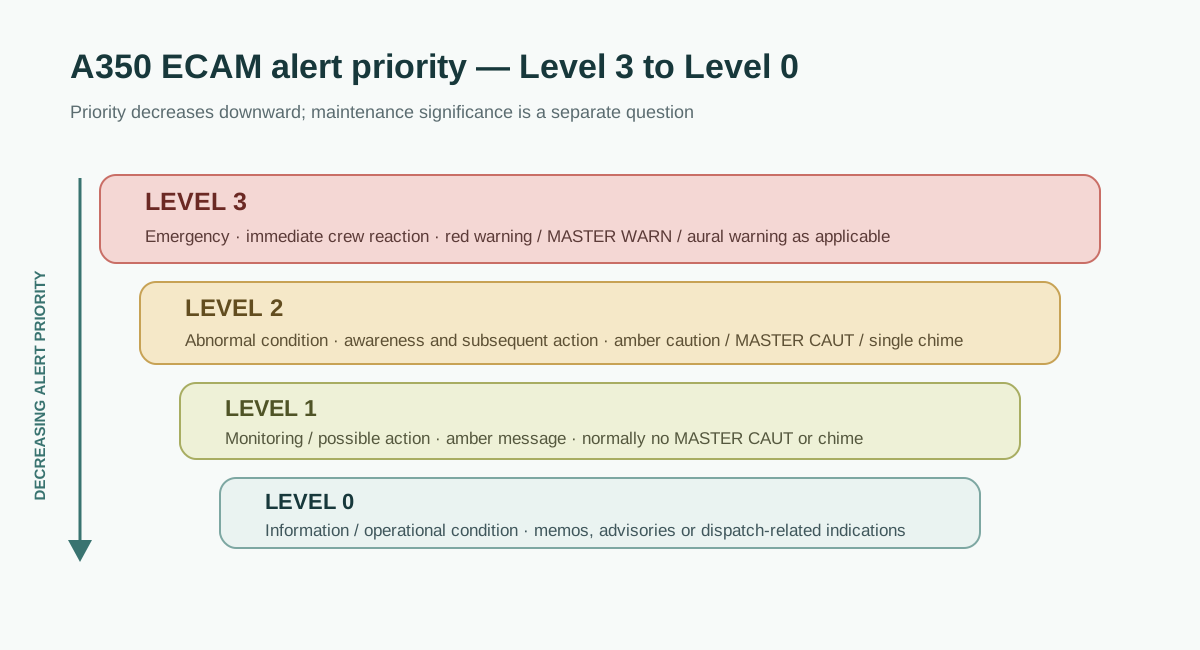
| Level | General meaning | Typical cockpit response |
|---|---|---|
| Level 3 | Emergency requiring immediate crew reaction | Red warning, MASTER WARN, aural warning, related system presentation as applicable |
| Level 2 | Abnormal condition requiring awareness and subsequent action | Amber caution, MASTER CAUT, single chime, related system presentation as applicable |
| Level 1 | Condition requiring monitoring and potentially crew action | Amber message, generally without MASTER CAUT or chime |
| Level 0 | Information or operational condition | Information such as memos, advisories or dispatch-related indications |
Level 3
Level 3 represents the highest alert priority. The supplied material associates this level with situations requiring immediate crew reaction. The cockpit response can include a red warning message, flashing MASTER WARN lights and a Continuous Repetitive Chime, specific sound or synthetic voice.
Level 2
Level 2 represents an abnormal situation requiring crew awareness and subsequent corrective or compensatory action. Typical effects include an amber caution message, fixed MASTER CAUT indications and a single chime.
Level 1
Level 1 generally identifies a lower-priority condition such as degradation or loss of redundancy where crew monitoring—and in some cases action—is required. It does not normally activate the same visual or aural attention getters used by Level 2 and Level 3 alerts.
Level 0
Level 0 covers information-type conditions such as certain memos, advisories and dispatch messages. “No chime” should therefore never be interpreted as “no technical significance.” Alert urgency and maintenance significance are different questions.
CAUSE VS PRIORITY
Failure categorization is different from alert level
Another common learning error is to confuse alert levels with failure categories.
Independent failure — an isolated failure that does not result from another failure.
Primary failure — a failure that causes the loss or degradation of other systems or equipment.
Secondary failure — a consequence caused by a primary failure.
The distinction matters because these concepts answer different questions: Alert level asks how urgently the crew must respond; failure category asks what relationship this failure has to other failures.
FLIGHT-PHASE LOGIC
Why flight phase changes what the crew sees
Not every technically valid alert is useful at every moment of flight. The FWS therefore uses aircraft flight phases as part of its alert-management logic. The supplied ATA 31 source identifies 13 calculated flight phases and describes how certain alerts can be inhibited during phases such as takeoff and landing.
The objective is workload management: information that is not immediately useful can be prevented from distracting the crew during a high-workload phase.
For a technical learner, this creates an important troubleshooting question: Was the condition absent—or was its alert intentionally inhibited because of the aircraft configuration or flight phase?
DEGRADED ARCHITECTURE
What happens when a display or part of the system fails
A modern cockpit should not be studied as though every display is an isolated instrument.
The A350 CDS supports automatic and manual reconfiguration of display formats in degraded configurations. The training material describes examples in which information from an unavailable DU can be transferred to a remaining DU.
This produces another valuable systems lesson: Loss of presentation does not automatically equal loss of source data.
When analysing an indication problem, separate the aircraft parameter or source, the communication path, the application producing the information, the DU presenting it, and the crew-control interface. Only then can “the screen is blank” be converted into a technically useful question.
AFTER THE INITIAL ALERT
ECAM STATUS, deferred procedures and Dispatch Messages
The A350 ECAM architecture also separates what matters now from what matters for the continuing aircraft status or next dispatch.
The STATUS function provides information associated with the aircraft state after failures, including relevant limitations, inoperative systems and deferred information.
A deferred procedure is an action intentionally postponed to a more appropriate stage rather than necessarily performed immediately with the initial alert.
The Dispatch function serves a different purpose again: it helps connect aircraft failure information with dispatch considerations. Airbus describes the A350 dispatch function as providing a clearer link between a detected condition and the corresponding MMEL consideration.
A Dispatch Message is therefore not simply “another caution.” It answers a different operational question.
TRACE THE ALERT
A maintenance engineer’s mental model for reading ECAM information
When studying an A350 ECAM indication, use six questions:
- Source — What aircraft system or sensor created the underlying information?
- Transport — Through which data path can that information reach the monitoring architecture?
- Decision — Is the FWS evaluating a failure, configuration, threshold or flight-phase condition?
- Priority — What alert level and failure relationship apply?
- Presentation — Which WD, SD, PFD, MFD or other format should show the result?
- After-effect — Does the condition create STATUS, deferred-procedure, maintenance or Dispatch consequences?
This framework is intentionally diagnostic rather than procedural. It helps a learner read architecture diagrams and understand cause and effect without turning educational material into unauthorized maintenance instructions.
For another example of AvioScope’s system-based learning approach, see the Airbus A350 Trent XWB thrust reverser system.
COMMON MISCONCEPTIONS
Common misconceptions
“ECAM and FWS are the same thing”
They work closely together, but they are not interchangeable terms. The FWS is central to alert computation; ECAM is the broader monitoring and crew-information function presented through the CDS.
“An ECAM alert comes directly from the failed component”
Not necessarily. Aircraft data can travel through networked and dedicated interfaces before the FWS evaluates a condition and the CDS presents the result.
“AFDX failure means all ECAM information disappears”
The architecture includes additional or backup interfaces for selected information. The exact degraded behavior depends on the function and configuration.
“No chime means the failure is unimportant”
Incorrect. Aural attention is associated with alert priority, not a universal measure of technical or maintenance significance.
“A Dispatch Message is an in-flight warning”
No. Dispatch information is intended to support assessment of aircraft dispatch consequences. It should not be treated as another name for an active warning or caution.
“If a display fails, the information is necessarily lost”
Not always. The A350 CDS includes display-reconfiguration capability, so the failure of a DU and the loss of the underlying information are different fault cases.
FAQ
Frequently asked questions
What does ECAM stand for on the Airbus A350?
ECAM means Electronic Centralized Aircraft Monitoring. It provides aircraft-system monitoring and supports the presentation of normal and abnormal operational information, including warnings, cautions, procedures, status information and checklists.
What is the difference between ECAM and the FWS?
The Flight Warning System performs central alert-related computation and management. ECAM is the crew-facing monitoring function that uses the CDS to present relevant aircraft and FWS information.
How many main Display Units does the A350 CDS use?
The supplied ATA 31 architecture describes six identical Display Units, with different formats assigned according to cockpit position and system configuration.
What are the four A350 ECAM alert levels?
The supplied configuration identifies Level 3, Level 2, Level 1 and Level 0, decreasing from emergency warning to informational conditions.
Why are some A350 alerts inhibited during takeoff or landing?
Alert inhibition prevents non-essential or inappropriate information from increasing workload during critical flight phases. Conditions judged necessary for immediate awareness are managed according to their applicable alert logic.
Can ECAM information be used instead of approved maintenance data?
No. ECAM indications can be important inputs to maintenance understanding, but maintenance, fault isolation, testing, deactivation, restoration and aircraft dispatch must use current applicable approved data and appropriately authorized personnel.
FINAL TAKEAWAY
Stop thinking of ECAM as a screen
Think of it as a chain: Aircraft condition → data acquisition → FWS logic → priority and inhibition → CDS presentation → crew interaction → operational and maintenance context.
A Warning Display tells you what the crew is being told. The FWS helps explain why that information was generated and with what priority. The CDS explains how it can be presented. STATUS and Dispatch information help explain what remains after the initial alert and what it may mean for aircraft availability.
That systems-level approach is central to AvioScope Academy: not memorizing one display at a time, but understanding how aircraft information moves, changes and becomes meaningful.